
Step-by-Step Mock Interview Preparation for Beginners
Start your interview journey with this beginner-friendly mock interview preparation guide. Learn how to build a strong foundation in Python while improving communication and confidence. This guide covers technical topics, HR questions, and practical exercises to help you perform better in interviews. Discover how to use tools like ChatGPT for mock sessions and feedback. With a step-by-step approach, you’ll gain the skills needed to handle real interviews successfully and stand out among other candidates.
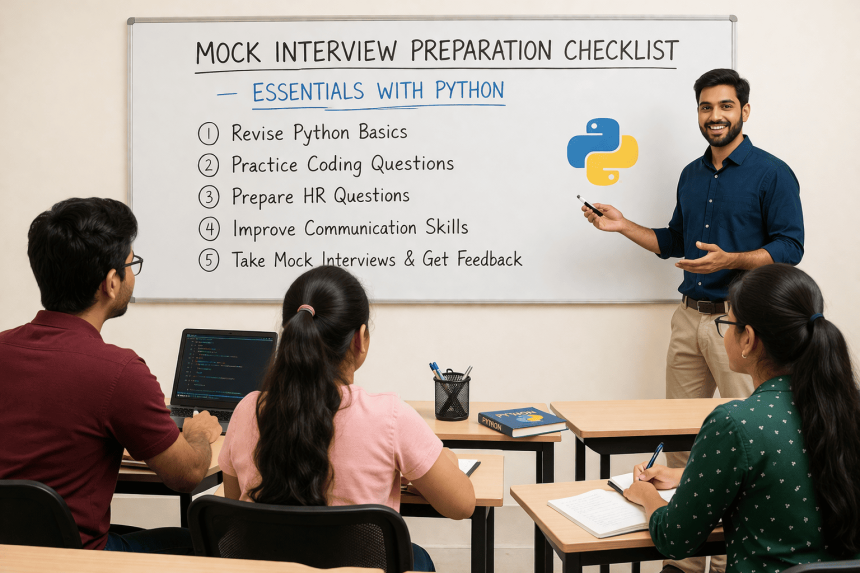
🗣️ Mock Interview Preparation Checklist — Essentials with Python
🗣️ Mock Interview Preparation Checklist — Essentials with Python
In 2025, mastering both technical and communication skills is essential for landing your dream job. Employers now seek candidates who not only write clean Python code but can also explain their logic confidently during interviews. That’s where mock interview preparation plays a crucial role.
At AI Computer Classes – Indore, students are trained to face real-world interviews with a blend of personality development and technical mastery. In this blog, you’ll explore a step-by-step checklist to prepare effectively for mock interviews — and how Python practice can enhance your confidence.
🧠 Step 1: Understand the Purpose of Mock Interviews
A mock interview simulates a real interview experience, helping you identify areas of improvement before the actual day.
You’ll learn to:
- Manage nervousness and body language
- Structure your answers clearly
- Communicate your technical knowledge confidently
- Get real-time feedback from mentors
💡 Learn from Experts at AI Computer Classes – Indore!
Boost your confidence with interactive mock interviews guided by industry professionals.
👉 Join now to master your preparation!
💻 Step 2: Brush Up Your Python Fundamentals
Even in personality-driven interviews, technical fluency matters.
Here’s what you must revise before your mock session:
- Python data types (list, tuple, dictionary)
- Conditional statements and loops
- Functions and object-oriented programming (OOP)
- File handling and exception management
- Real-world mini-projects (e.g., calculator, to-do app, data cleaner)
🧩 Example Question:
“Can you explain the difference between a list and a tuple in Python?”
Practicing such questions daily helps you speak confidently about coding concepts during interviews.
🎯 Step 3: Develop Communication Confidence
Communication is the bridge between your ideas and the interviewer’s understanding. Work on:
- Eye contact: Stay confident and calm.
- Tone: Keep it professional and enthusiastic.
- Structure: Use the STAR method (Situation, Task, Action, Result) for behavioral questions.
💬 Example:
“Tell me about a challenge you faced while coding a project.”
Use STAR to narrate a concise, impactful story.
🪞 Step 4: Practice Common HR and Technical Questions
Here’s a list of must-practice questions:
HR Questions:
- “Tell me about yourself.”
- “Why should we hire you?”
- “What are your strengths and weaknesses?”
Python/Technical Questions:
- “How do you handle errors in Python?”
- “Explain list comprehensions.”
- “What is the use of decorators in Python?”
🧠 Tip: Record your answers to evaluate tone, pacing, and clarity.
⚙️ Step 5: Use AI Tools for Practice
AI-based tools can help simulate real interviews. For instance:
- ChatGPT: Generate random interview questions and practice answering them.
- Python IDEs: Write and debug your code under time constraints.
- Power BI or Figma: Present your projects visually to enhance communication impact.
💡 AI Integration Example:
Ask ChatGPT — “Conduct a mock Python interview with technical and HR questions.”
Then practice your responses aloud.
🧾 Step 6: Review and Improve After Each Mock Interview
After your session, note down:
- What went well
- What felt confusing
- Which answers can be refined
At AI Computer Classes, mentors provide detailed feedback on speech clarity, coding explanation, and confidence level.
You’ll learn to rephrase your answers to sound professional and concise.
🏆 Step 7: Build an Interview Portfolio
Create a portfolio folder that includes:
- Resume and LinkedIn profile
- Python project summaries
- Certificates (Excel, Power BI, AI tools)
- Mock interview feedback reports
This gives you an edge in real interviews — showing both preparation and growth.
💡 Learn from Experts at AI Computer Classes – Indore!
Enhance your confidence with mock interviews, resume building, and technical training.
👉 Enroll now at AI Computer Classes
📍 Located in Old Palasia, Indore
🚀 Benefits of Mock Interview Practice
✅ Builds confidence and reduces anxiety
✅ Improves technical explanation skills
✅ Enhances communication and personality impact
✅ Identifies weak areas for improvement
✅ Prepares you for real interview pressure
🌟 Conclusion
A successful interview isn’t just about knowing Python — it’s about how confidently you present your ideas. Mock interviews are your training ground to transform fear into confidence.
At AI Computer Classes – Indore, you’ll master not just technical skills but also the art of communication — empowering you to crack interviews with ease.
Prepare smart, speak confidently, and let your skills shine! 🌟
📞 Contact AI Computer Classes – Indore
✉ Email: hello@aicomputerclasses.com
📱 Phone: +91 91113 33255
📍 Address: 208, Captain CS Naidu Building, near Greater Kailash Road, opposite School of Excellence For Eye, Opposite Grotto Arcade, Old Palasia, Indore, Madhya Pradesh 452018
🌐 Website: www.aicomputerclasses.com

Blockchain Technology in Indore – Build Skills for the Digital Future


📄 Complete Guide: Create Editable PDF Forms from Word using TradingVi...
Edit Short Form Video for Social Media — Complete Guide
Edit Short Form Video for Social Media — Complete Guide. Get practical lessons and hands-o...